Search for topics

Sunday, November 1, 2015

How to Root Samsung Galaxy Young 2 Sm-G130E and Sm-G130HN

Network     Technology     
GSM / HSPA
Launch     Announced     2014, June
Status     Available. Released 2014, October
Body     Dimensions     109.8 x 59.9 x 11.8 mm (4.32 x 2.36 x 0.46 in)
Weight     108 g (3.81 oz)
SIM     Dual SIM (Micro-SIM, dual stand-by)
Display     Type     TFT capacitive touchscreen, 256K colors
Size     3.5 inches (~55.5% screen-to-body ratio)
Resolution     320 x 480 pixels (~165 ppi pixel density)
Multitouch     Yes
Platform     OS     Android OS, v4.4.2 (KitKat)
CPU     1 GHz Cortex-A7
Memory     Card slot     microSD, up to 32 GB
Internal     4 GB, 512 MB RAM
Camera     Primary     3.15 MP, 2048 x 1536 pixels
Features     Geo-tagging
Video     480p@24fps
Secondary     No
Sound     Alert types     Vibration; MP3, WAV ringtones
Loudspeaker     Yes
3.5mm jack     Yes
Comms     WLAN     Wi-Fi 802.11 b/g/n, Wi-Fi Direct, hotspot
Bluetooth     v4.0, A2DP
GPS     Yes, with A-GPS, GLONASS
Radio     FM radio
USB     microUSB v2.0
Features     Sensors     Accelerometer
Messaging     SMS(threaded view), MMS, Email, Push Mail, IM
Browser     HTML
Java     No
     - MP4/H.264 player
- MP3/WAV/eAAC+/FLAC player
- Photo/video editor
- Document viewer
Battery           Li-Ion 1300 mAh battery
Stand-by     
Talk time     Up to 6 h (3G)
Music play     Up to 24 h
Misc     Colors     Iris Charcoal, White
SAR US     0.87 W/kg (head)     0.94 W/kg (body)    
SAR EU     0.92 W/kg (head)     0.44 W/kg (body)    
Price group     2/10
I- Download Requred files:
Sm-G130E Root Kernel
Odin v3.10
II-Connect device in download mode on your computer.

III-Run Odin v3.10

IV-Select G130EXXU0ANG3_ROOT.tar to AP section.

V-Click Start button.

VI-Root with iRoot


That's All

Example Video


How to Root Samsung Galaxy J1 Ace Sm-J110H Tested Method


About
Full name    Samsung Galaxy J1 Ace SM-J110H
Manufacturer    Samsung
Model    Galaxy J1 Ace SM-J110H/DD
Type    Smartphone
Launch
Announced    August, 2015
Price
MRP in India    6400 INR
Price in USA $    96 USD
Price in UK £    62 GBP
in Canadian Dollar    128 CAD
in Australia    136 AUD
in EURO    86 EUR
Network
Technology    GSM / HSPA
Frequency Bands    GSM 850 / 900 / 1800 / 1900 ;HSDPA 900 / 2100
Speed    3G
GPRS    Yes, Class 12
EDGE    Yes

Also Known as Samsung Galaxy ACE SM-J110H/DD, SM-J110H, SM-J110L, SM-J110, SM-J110H/DS , J110L/DS, SM J110-H .
Body
Dimensions    130.1 x 67.6 x 9.5 mm
Weight    128 grams
SIM    Dual Sim
Display
Type    Super AMOLED
Size    4.3
Resolution    480 x 800 pixels
Touch    Yes
Protection    na
Platform
OS    Android
Soft Version    v4.4 KitKat
Chipset   
CPU    1.3GHz Dual Core
GPU   
Memory
Expandable    64GB
Internal / ROM    4GB
RAM    512MB
Camera
Rear Camera    5MP
Features    LED Flash, Auto Focus
Video Recording    Yes
Front Camera    2MP
Sound / Video
Fm Radio    Yes
Loudspeaker    Yes
3.5mm jack    Yes
Video playback    HD
Connectivity
WLAN    Wi-Fi 802.11 b/g/n
Bluetooth    v4.0
GPS    Yes
USB    microUSB v2.0
USB OTG    Na
Other    Ultra Power Saving Mode
Sensors
Sensors    Proximity, Accelerometer, Gravity
SAR   
Battery
Battery    1800mAh
Stand-by   
Talk time   
Colors
Colors    White, Black


I-Download Required Files.

Samsung J110H Pre Rooted Firmware


Odin v3.10


II-Connect in download mode.

III-Run Odin V3.10

IV-Select J110HXXU0AOGA_Pre_Rooted_System_v4.4.4.tar.md5 to AP section.  

V-Click Start button.

That's All

Example video


Thursday, October 29, 2015

Samsung Reactivation Lock Hack V2 : Galaxy Note 5

Attention!!!
Is for informational purposes only.

Tested devices
 SM-J500
SM-J700
SM-A800
SM-G361H
SM-N920C
...
  
Required equipments:

I-Otg Cable.


II-Card reader and micro sd card(or Flash disk).

III-Account bypass apk. 

Click Here to Download Samsung Account Bypass Apk

Click Here to Download Samsung Account Bypass Apk from Mirror

How to do?

I-Copy Bypass any Samsung Google Account Lock.apk to sdcard.

II-Power on your Samsung locked device.

III-Put otg cable to device.Plug in sdcard to card reader and connect.

IV-SD card file system will automatically turn on the device.

V-Install apk file and open.Setting section of the device will open .

VI-Do factory reset.

Example

(SM-G361H Android 5.1.1)


Samsung Galaxy Note 5 SM-N920C 


That's All 

Tuesday, October 27, 2015

How Can I Root Samsung Galaxy Win ( GT- I8552 ) %100 Tested Method


Network & Platforms
SIM Card Support    :     Dual, (Mini-SIM and Micro-SIM, dual stand-by)
Network Band    :     GSM
GSM 2G Bands    :     GSM 850, GSM 900, GSM 1800, GSM 1900
GSM 3G Bands    :     HSDPA 900, HSDPA 2100
Operating System    :     Android
OS Version    :     Android OS,v4.1.2 (Jelly Bean)
Chipset    :     Snapdragon™ Qualcomm Processor
Processor    :     Quad Core Processor
Processor Speed    :     1.2 GHz
Flight Mode    :     Yes
Memory
Internal Memory    :     8 GB
RAM Size    :     1 GB
Memory Card Slot    :     MicroSD
Memory Support    :     Upto 64 GB
Body & Design
Form Factor    :     Full touch Bar
Dimensions    :     133.3 x 70.7 x 9.7 mm, (5.25 x 2.78 x 0.38 in)
Weight    :     144g, Exactly 143.9 g (5.04 oz)
Sensors    :     Accelerometer, Proximity, Compass, Gyro
Orientation Support    :     Yes
Keypad    :     Touch
Dedicated Keys    :     Volume, Menu
Device Security    :     PIN code Lock
Screen & Display
Display Type    :     TFT capacitive touchscreen
Display    :     16M Colors
Pixel density range    :     125 to 200 ppi, (~199 ppi pixel density)
Screen Size    :     480 x 800 pixels
Display Size    :     4.7 Inch
Touch Mode    :     Capacitive Multipoint-Touch
Multi Touch Support    :     Yes
Call Management
Speakerphone    :     Yes
Voice Mail    :     Yes
Picture Caller ID    :     Yes
Phonebook Memory    :     Unlimited
Call Records    :     Dialed Numbers, Call Duration, Call Log, Received Calls
Ringtone or Alert Type    :     Vibration, MP3 ringtones, WAV
Camera & Features
Primary Camera    :     5.0 Megapixels, 2592 x 1944 pixels
Primary Camera Type    :     Digital
Camera Flash LED    :     Yes
Secondary Camera    :     Yes
Secondary Camera Type    :     VGA
Geo-Tagging    :     Yes
Date-Tagging    :     Yes
Hd Video-Recording    :     With 480p
3G or Video Call    :     Yes
Camera Zoom    :     Digital Zoom
TV Output    :     No
Video Quality    :     480p 30 FPS
Panorama    :     Yes
Camera Features    :     Autofocus, Touch focus, Face Detection, Smile detection
Multimedia (Audio / Video)
Loudspeaker    :     Yes
Audio Format    :     AAC, MP3, AAC+, eAAC+
Video Format    :     MPEG, H.264, H.263
3.5mm Headphone Jack    :     Yes
FM Radio    :     With RDS
Streaming Support    :     Yes
Data Connectivity & Internet
GPRS    :     With GPRS
EDGE    :     With EDGE
Data Speed    :     HSUPA 5.76 Mbps, HSDPA 21 Mbps
Browser Name    :     Android Browser
Browsing Support    :     HTML5
WiFi Support    :     Wi-Fi 802.11 b/g/n
Hot Spot    :     Yes
Map Support    :     Google Maps
Bluetooth Support    :     Bluetooth 3.0
USB-Support    :     microUSB 2.0
PC-Sync Support    :     Yes
Remote Sync Support    :     Yes
NFC (Near Field Communication)    :     Yes
Application Support
Office Tool Support    :     Document Viewer
inbuilt applications
    :     Calculator, Calendar, Phonebook, Alarm clock, Organizer, Gmail, Google Calendar, Google Talk, Google Search
Social Applications    :     Google Talk, Facebook chat, YouTube, Gmail, Google Search
Java Support    :     Yes, with Java MIDP emulator
Communication & Tracking
Messaging    :     SMS, MMS, Email, Push Mail, IM
GPS Tracking    :     with A-GPS support
Mobile Tracker    :     No
Battery & Power Usage
Battery Model    :     Li-Ion 2000 mAh
Other Features
ChatON
Sina microblogging
Network ring (film and television / the game circle / music scene / pleasure reading circle)
Active noise cancellation with dedicated mic
SNS integration
Voice memo/dial/commands
Predictive text input


I-Download Required Files:

CWM for I8552


SuperSu for I8552


II-Connect your Gt-i8552 in download mode one your computer.

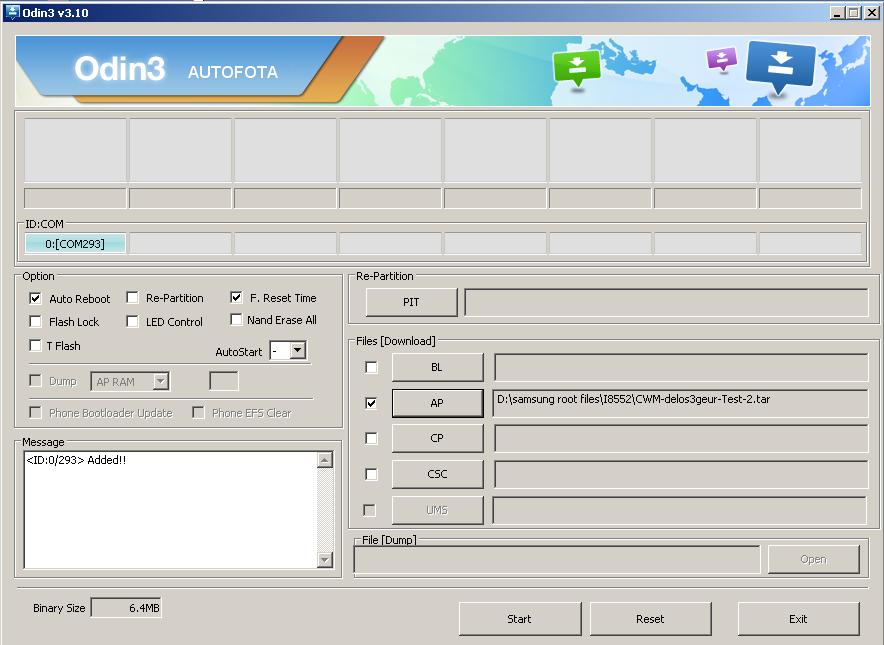
III-Run Odin and select CWM-delos3geur-Test-2.tar to AP section and click Start button. 

 
 IV-Copy UPDATE-SuperSU-v2.40.zip to sdcard.Put sdcard to phone.

V-Use vol+ ,home,power key combination and enter recovery mode.

VI-Install SuperSu...

That's All

Tuesday, October 13, 2015

Maui META 3G ver 8.1516.0.0 Download Mtk65xx imei , Sn , nvram , null , unknown etc... fixer


I-Power off your MTK65XX Phone.

II-Run Maui Meta 3g tool

III-Select Options/Connect smart phone in to meta mode.

IV-Click Reconnect button.

V-Connect phone and install drivers.

VI-That's All

You'll be amazed

Maui Meta 3g Build  ver 8.1516.0.0


Ap-Bp Database


CDC Drivers